Showing posts with label Tips and Tricks. Show all posts

How to Increase Copying Speed in Windows

1 comment
Hello Everyone!!
Today we are posting How to Increase Copying Speed in Windows.
How-to-Increase-Copying-Speed-in-Windows
You all might be Wondering if it is Possible to Increase Copying Speed?
Yes it is Possible!!

In Today's Topic, we are Going to use a Software called "Teracopy" which helps to Increase the Copying Speed and the Best Part is, it Works with any version of Windows!!


Also Read: How to Change Folder Color in Windows
Also Read: GTA 5 Highly Compressed 15 Mb

How to Increase Copying Speed in Windows

Its easy to Setup and use Teracopy!
Here ae Some very Simple Steps to Increase your Copying Speed..

1.)  Download Teracopy from Below.
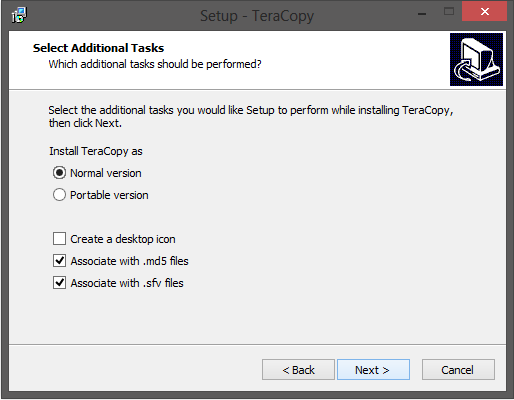
2.)  After Downloading, Install Teracopy in your Computer.


All Done!!
You have Successfully Increased your Copying Speed!!

Screenshots

Screenshot 1
How-to-increase-copying-speed-in-Windows
Screenshot 2
How-to-increase-copying-speed-in-Windows
Screenshot 3
How-to-increase-copying-speed-in-Windows
Screenshot 4
How-to-increase-copying-speed-in-Windows
Screenshot 5
How-to-increase-copying-speed-in-Windows
 Screenshot 6
How-to-increase-copying-speed-in-Windows


Download Teracopy

You can Download Teracopy for Free Just Click the Download Button.
Enjoy!!
How-to-increase-copying-speed-in-Windows


If you face any Problems Regarding the Software, Post a Comment.


Liked this Post, Don't Forget to Like us on Facebook or Join us on Our Group!!
Tell Others about Us!!

Keep Visiting!! 


Posted by 

 Facebook Profile
Yogesh Jethwani.                                                                                       I am a Student of Class 12. I am very Interested in Computers and Blogging, so I decided to start "YJ-ES Latest Buzz" and I am Working hard on it.
read more

How To Change Folder Color in Windows

No comments
Hello Everyone!!
Today we are Posting How to Change Folder Color in Windows.

How-to-Change-Folder-Color-in-Windows
**Update** - This tutorial works for all versions of Windows, i.e., Windows XP, 7, 8, 8.1 and Windows 10 too. ENJOY!

We all have Windows installed in our Computers, Laptops and sometimes Phones and We all are Fed Up of the Simple Default Folder Color.

We all want Something new after some time because we get bored seeing the same color again and again.


So here we are Posting Something to Change Default Colour of Folders.

The Software which is used to change the Color of Folders is called "Folder Colorizer"

How to Change Folder Color in Windows?

So, the Question is How to change the color of Folders in Windows?

Here are Some very Simple Steps to Follow : 
1.)  Download Folder Colorizer from Below.
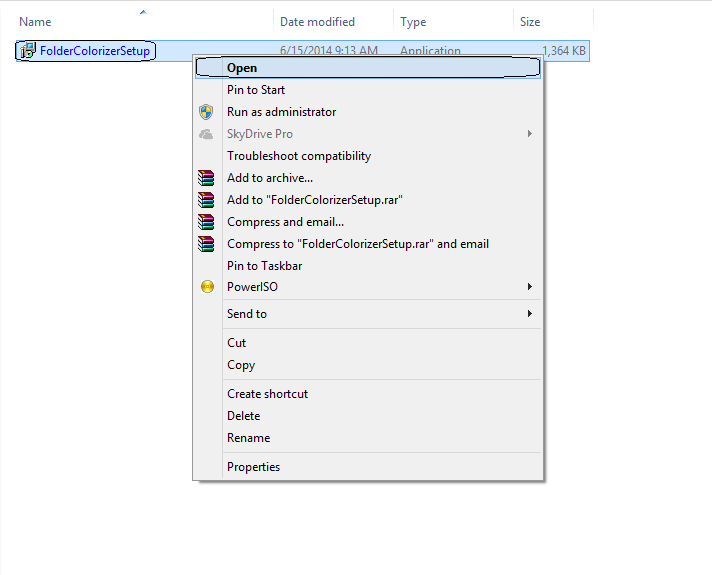
2.)  Install it on your Computer or Laptop.
3.)  Select any Folder, Right Click on that Folder, Click on Colorize!, Select the Color you want.

All Done!!

You have Successfully changed the Color of your Folder...


Screenshots

Screenshot 1
How-to-change-folder-color-in-windows
Screenshot 2
How-to-change-folder-color-in-windows
Screenshot 3
How-to-change-folder-color-in-windows
Screenshot 4
How-to-change-folder-color-in-windows

Download Folder Colorizer

You can Download Folder Colorizer for Free Just Click the Download Button.
Enjoy!!
How-to-Change-Folder-Color-in-Windows


If you face any Problems Regarding the Software, Post a Comment.


Liked this Post, Don't Forget to Like us on Facebook or Join us on Our Group!!
Tell Others about Us!!

Keep Visiting!! 


Posted by 

 Facebook Profile
Yogesh Jethwani.                                                                                       I am a Student of Class 12. I am very Interested in Computers and Blogging, so I decided to start "YJ-ES Latest Buzz" and I am Working hard on it.
read more

IObit Toolbox Free Download 2015

No comments
Hello Everyone!
Today I am posting IObit Toolbox for Free Download.

IObit-Toolbox-Free-Download-2015
IObit is the company which provides Advanced System Care 8, IObit Malware Remover, IObit Uninstaller, etc.

Tools provided by IObit are all very trustworthy and work great.

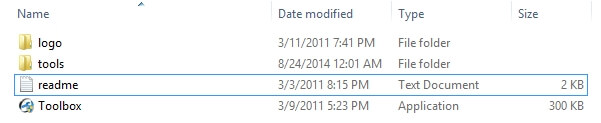
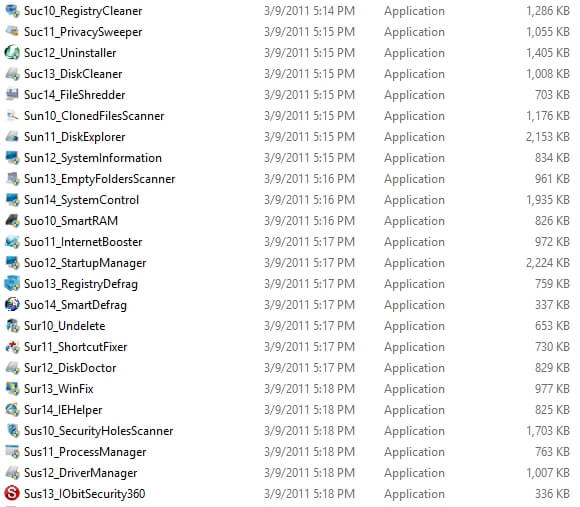
In this post, I will be giving IObit Toolbox for Free Download. The Toolbox contains 25 Tools which are very useful and a computer nerd should have it.

Tools are  very effective and work great. The toolbox contains the following tools.
  • IObit Uninstaller
  • Internet Booster
  • Win Fix
  • Shortcut Fixer
  • Startup Manager
  • Registry Cleaner
  • Privacy Sweeper
  • Disk Cleaner
  • File Shredder
  • Smart RAM
  • Registry Defrag
  • Smart Defrag
  • Undelete
  • Disk Doctor
  • IE Helper
  • Security Holes Scanner
  • Process Manager
  • Driver Manager
  • IObit Security 360
  • Cloned File Scanner
  • Disk Explorer
  • System Information
  • Empty Folder Scanner
  • System Control
  • Driver Manager
These are all the tools. Aren't they great?
These tools will help to make a PC or Laptop free from Lag, Virus, Malware, and other harmful Softwares. Also, you can get rid of extra Registries of removed Apps and canclean your Startup and increase the Boot speed.

In all ways this IObit Toolbox will help you.

Screenshots for IObit Toolbox

Screenshot 1
IObit-Toolbox-Free-Download-2015
Screenshot 2
IObit-Toolbox-Free-Download-2015
Screenshot 3
IObit-Toolbox-Free-Download-2015

Download IObit Toolbox for Free


You can download IObit Toolbox for free from the download link given below.
Just click the download button and wait for 5 seconds and click "Skip Ad" button and your download will start automatically.

If you liked the Toolbar and our Efforts, do share it with your friends!

File Size - 21 MB
IObit-Toolbox-Free-Download-2015

If you like the toolbox then don't forget to share it with your Gamer friends! As we know that Sharing is Caring.

If the Download Links don't work then feel free to Comment below and let us know.

Liked this Post, Don't Forget to Like us on Facebook and Join us on Our Facebook Group!
Tell Others about Us!

Keep Visiting!


Trending : Asphalt 8 Mod APK Latest VersionHow to Play Java Games on PC, How to Increase Download Speed in IDM


Posted by 

Yogesh-Jethwani
Yogesh Jethwani.
I am the Admin of YJ ES Latest Buzz. I am Professional Blogger, a Good Programmer, 2-D Game Designer and a Good Person. Check out more about me Here.
read more

How to Create Silent Installer with Winrar

No comments
Hello Everyone!
Today I am posting a tutorial on How to Create Silent Installer with Winrar.
Create-Silent-Installer-with-Winrar

You must have heard about Silent Installers. If not then let me tell you about it.


What is a Silent Installer?


Silent Installers are a type of exe files which do all the processing in the background and you don't get any popup.

The best example for it is Download and install the Offline Installer for Chrome and see that you will not get any popup to accept or click Next.

This is the Silent Installer and in this tutorial I will tell you How to make your own Silent Installer and I will be using Winrar for this tutorial.

There are lots of softwares available on the Internet to make Silent Installers but I use Winrar because it is easy to use and almost everyone has Winrar installed it in their systems so they don't have to especially download some software.

Okay lets start the tutorial.

Before starting, if you don't have Winrar, you can download it from here.


How to make Silent Installer using Winrar?


Okay first of all find the file whose Silent Installer you have to make.
In this tutorial, I will use a folder having BitTorrent in it.

Okay, now create a rar archive for that file.
Create-Silent-Installer-with-Winrar

Once the archive is made, open it and click SFX in th toolbars section as shown in the image below.
Create-Silent-Installer-with-Winrar

After that a new window will open. Clck the Advaced SFX Options button and then go to Modes tab and click "Hide All"as shown in the image below.
Create-Silent-Installer-with-Winrar

Now click OK.
Thats all! You now have created your own Silent Installer with Winrar.

Once you click OK, you will get an exe file which will extract the file that you compressed initially without showing any other new window. All the process of extracting will be done in background.

This was the Whole tutorial. Share it if you like it because Sharing is Sexy!

Liked this Post, Don't Forget to Like us on Facebook and Join us on Our Facebook Group!
Tell Others about Us!

Keep Visiting!


Trending : How to Play Java Games on PCGTA 5 CrackNeed for Speed Most Wanted 2012 Crack.


Posted by 

Yogesh-Jethwani
Yogesh Jethwani.
I am the Admin of YJ ES Latest Buzz. I am Professional Blogger, a Good Programmer, 2-D Game Designer and a Good Person. Check out more about me Here.
read more

How to Play Java Games on PC

2 comments
Hello Everyone!
Today I am going to post a tutorial on How to Play Java Games on PC.
How-to-Play-Java-Games-on-PC
As I have already posted about How to Play PS2 Games on PC and How to Play PSP Games on PC so today's tutorial is on How to Play Java Games on PC.

We used to play Java games a lot on our Mobile Phones when Android didn't took over and many people still miss those games. So this tutorial is for the sake of those people.

Okay, this will be a short and very easy tutorial and I think will not take much time and you'll be playing Java Games on your PC.


How to Play Java Games on PC


Alright, this tutorial will be short and very easy. So first you have to download and install Java Runtime Environment (JRE) on your Computer. If you don't have it installed then you can't play Java Games on PC.

So, go ahead and download the JRE from the link below.
Once you have it installed, you need to download and install the main software called "KEmulator".

Like PPSSPP and PCSX2 it is also an Emulator but it enables you to run Java Games.

Okay, you can Download KEmulator from the download link given below.

Once you have downloaded it, extract the rar file and you will get the Emulator ready to use.

Once it is extracted, you can play Java Games on your Computer. Using this Emulator, you can also run different apps of Java.

Below are the Screenshots on How to Run Java Games on PC.


Screenshots on How to Play java Games on PC

Screenshot 1
How-to-Play-Java-Games-on-PC
Screenshot 2
How-to-Play-Java-Games-on-PC


Download KEmulator for Java


You can Download PC Java Emulator for free from the download link given below.

If you like the tutorial then do share it with your friends. Every share you do motivates me to write more such tutorials.
How-to-Play-Java-Games-on-PC

If the Download Links don't work then feel free to Comment below and let us know.

Liked this Post, Don't Forget to Like us on Facebook and Join us on Our Facebook Group!
Tell Others about Us!

Keep Visiting!


Trending : PCSX2 1.2.1 BIOSAvengers Age of Ultron Download Without SurveyGTA 5 Crack.


Posted by 

Yogesh-Jethwani
Yogesh Jethwani.
I am the Admin of YJ ES Latest Buzz. I am Professional Blogger, a Good Programmer, 2-D Game Designer and a Good Person. Check out more about me Here.
read more

How to Activate IDM for Lifetime

4 comments
Hello Everyone!
In this post I will tell you How to Activate IDM for Lifetime.
How-to-Activate-IDM-for-Lifetime
We all are fed up with the warning that IDM gives when we are using fake Serial key and to fix it I will tell you some tricks using which your IDM will be activated for lifetime. It means no more warnings.

In this post I will give you the whol procedure on activating it for Lifetime and I will try to provide the file so that you can activate IDM without doing anything but copy and paste. Also I will try to upload a video tutorial for this. Okay, So lets get started.

Why Activate IDM for Lifetime?


The question is Why Activate IDM for Lifetime and why not download latest versions with crack.
The answer to it is simple. You have to search for a working latest version of IDM, find its crack, download all the things and then uninstall the previous version and install the latest version. Its a very long method. To overcome this you should activate it forever.

Also we know that when we use fake serial key to register IDM, it detects it after some time and starts giving you annoying warnings. To overcome that and to get all the latest updates of IDM we try to activate it for lifetime.

It is very simple procedure and you will read How to Activate IDM for Lifetime below.

How to Activate IDM for Lifetime


To activate IDM for Lifetime just follow the simple steps given below. The procedure is very small and will not tae more than 5 minutes and you will be ready for all the updates because your ISM will be activated for lifetime.

First of all install a latest version of IDM with crack. You are doing it for the last time.
Now follow the points given below.

  • Once the IDM is installed and crack is copied, exit it from the system tray or just click the process from task manager.
  • After that go to "C:\Windows\System32\Drivers\etc\" and then open the file named "Host".
  • Now Enter the code given below in the Host file and save it on the Desktop.

127.0.0.1 tonec.com
127.0.0.1 www.tonec.com
127.0.0.1 registeridm.com
127.0.0.1 www.registeridm.com
127.0.0.1 secure.registeridm.com
127.0.0.1 internetdownloadmanager.com
127.0.0.1 www.internetdownloadmanager.com
127.0.0.1 secure.internetdownloadmanager.com
127.0.0.1 mirror.internetdownloadmanager.com
127.0.0.1 mirror2.internetdownloadmanager.com

  • Okay, after pasting the code, save it on the desktop.
  • Now copy the new Hosts file and paste it in the original folder and replace the previous one.
  • Now open IDM and if it asks for registration, enter the fake details and use the serial key given below and activate it.
SPOZ9-2E9IO-AKDRY-LIKEU

All Done!
Now you have IDM activated for Lifetime.

Help! I am getting some Problems


The problems that you can get are listed here with the solutions.

I can't save the Hosts file.
Yes, you cannot save the hosts file. You have to click "Save As" and then save it on the desktop. After saving on Desktop, copy it and replace the original one.

The new Hosts file is a txt file.
This is the most common problem that you may face. All you have to do is save the hosts file on the desktop with the extension ".txt". Now open My Computer and click "Organize" in the top left corner of the window. Now click the View tab and untick "Hide Extension for known File Types" and click OK. Now rename the new Hosts file and remove the extension from it. All Done!

I am using Windows 8 and can't change the extension.
If you're using Windows 8 click the "View" tab at the top and select "File Name Extension" and follow the steps from the above.


Download the Hosts File


You can download the Hosts file and replace the original one with the downloaded one. This way all your work will be automated and you don't have to do anything except the copy and paste.

Just Download the Hosts file from below and paste it in "C:\Windows\System32\Drivers\etc\" and replace the original one.

Click the Download button given below and wait for 5 seconds and then click "Skip Ad" button and your download will start automatically.
How-to-Activate-IDM-for-Lifetime
If you find this crack useful then don't forget to share it with your friends. As we all know that Sharing is Caring so do Share this post using the Sharing buttons given below or using the sharing sidebar at the left. :D

If the Download Links don't work then feel free to Comment below and let us know.

Liked this Post, Don't Forget to Like us on Facebook and Join us on Our Facebook Group!
Tell Others about Us!

Keep Visiting!


Trending : GTA 5 Crack Free DownloadNeed for Speed Most Wanted 2005 CrackAvengers Age of Ultron Free Download.


Posted by 

Yogesh-Jethwani
Yogesh Jethwani.
I am the Admin of YJ ES Latest Buzz. I am Professional Blogger, a Good Programmer, 2-D Game Designer and a Good Person. Check out more about me Here.
read more

How to get Virtual Piano in PC or Laptop

No comments
Hello Everyone!
Today's post is an interesting one. I am going to post something about Piano and a tutorial which will help you to get a Virtual Piano in Computer. Yes, you read it right. A full tutorial on How to get Virtual Piano in PC or Laptop.
Virtual-Piano-PC-Laptop-2015
Okay, So let me tell you more about it. There's a software called "Virtual Piano Keyboard" which can be installed in any Computer and anyone can play it.

Okay below is more about it and the Download link will be at the end of the post.

Virtual Piano for Computer


Okay, as of now you know the name of the Software and now you are eager to play it on your Computer too.
So let me tell you more about it.

It is a Software which you can Install on your PC or Laptop and then you can play it. Its as easy as Pie!

Virtual Piano Keyboard is a Freeware which can be downloaded and used without any problem. It is a very small software of size 1.68 MB and can be Downloaded very easily.
Also I have compressed it so its size is now only 686 KB.

All you have to do is Download, Install and Play it and have fun.

How to get Virtual Piano in PC


It is very simple to Download and Setup the Piano. Just follow the steps given below and then you will be able to use Virtual Piano in you Computer or Laptop too.

Step 1.) Download Virtual Piano Keyboard from below.
Step 2.) Extract it using Winrar (Don't have Winrar, Download it from here).
Step 3.) Install it in you PC and run it.

All done! You now have Virtual Piano in your PC or Laptop.

Screenshots

Screenshot 1
Virtual-Piano-PC-Laptop-2015


Download Virtual Piano for PC or Laptop


You can Download Virtual Piano for you PC or laptop very easily. Just click the Download Link given below and wait for 5 Seconds and then click "Skip Ad" and your Download for Virtual Piano will automatically start in a few seconds.

You will get you file in seconds and you can help us grow by Sharing this post on Facebook, Twitter, Google+, etc. in seconds. As we know that Sharing is Caring. :)

If you face any problem regarding the software or the Download Link, feel free to comment below and let us know so that we can fix it ASAP.

Virtual-Piano-PC-Laptop-2015

If the Download Links don't work then feel free to Comment below and let us know.

Liked this Post, Don't Forget to Like us on Facebook and Join us on Our Facebook Group!
Tell Others about Us!

Keep Visiting!


Trending : mCent Free Recharge Trick for unlimited Recharge, YouWave v3.19 Crack Patch Download, How to run PSP Games in PC.


Posted by 

Yogesh-Jethwani
Yogesh Jethwani.
I am the Admin of YJ ES Latest Buzz. I am Professional Blogger, a Good Programmer, 2-D Game Designer and a Good Person. Check out more about me Here.
read more

Flipkart UNLIMITED Refer and Earn Trick - Rs. 50 Coupon Code per Refer

No comments
Hello Everyone!
Today is the day when you can have almost whatever you want from Flipkart. As Flipkart has started a Refer and Earn Program so here we are with the UNLIMITED Trick of Flipkart Refer and Earn Program using which you can get Unlimited Rs. 50 Coupon Code. It means Shopping for Free! So below is the Flipkart UNLIMITED Refer and Earn Trick.
Flipkart-Unlimited-Refer-Earn-Trick
Okay now I will discuss about Flipkart's refer and earn Trick and then I will tell you how you can get Unlimited Rs.50 Coupon Code.

What is Flipkart's Refer and Earn Program?


Okay, Flipkart has started a program in which you have to Download the app, Enter you Number to create an account, then Enter your Partner's referral code and then you will get a Rs. 50 Coupon Code and you Partner will also get a Rs. 50 Coupon Code. 

It is an amazing offer. If you can create a lots of accounts using Different Numbers then you can have double the number of Coupon Codes that too of Rs. 50.

Okay so lets start the UNLIMITED Trick to get Rs. 50 Coupon Codes.

Flipkart UNLIMITED Refer and Earn Trick - Rs. 50 Per Refer


Okay, now lets start the Unlimited Trick which is the main part of this post.

Okay just follow the steps given below and do exactly as written below or you will not get any Coupon. It is not much tough but you need to be careful while using the Referral Codes. Okay lets do this.

Step 1.) Download Flipkart Mobile App from here [Click Here]

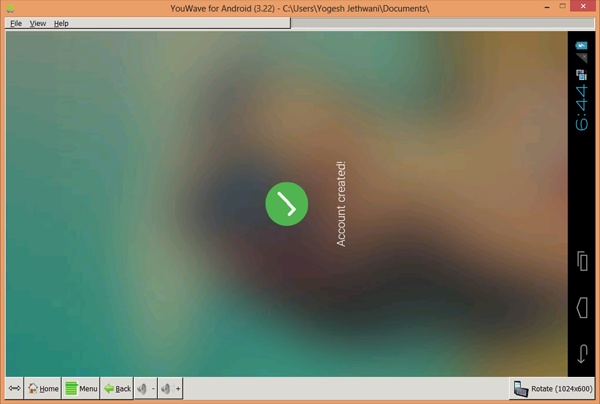
Step 2.) Install it and Open the app. Now enter a Mobile Number which is not Registered on Flipkart. After entering the number, verify it using OTP. Once it is done, choose a Password and create your Acount.
Flipkart-Unlimited-Refer-Earn-Trick
Step 3.) Once your Account is created, Click the Notification Icon and then click the Third Notification and then click the "Apply Code" button at the top.

Step 4.) [IMPORTANT STEP] Now Enter the referral code
84v5uu
Flipkart-Unlimited-Refer-Earn-Trick
NOTE - In order to get Rs. 50 Coupon Code for Signing Up, you have to use the Referral Code given above. It will give you Rs. 50 Coupon Code and I will also get a Rs. 50 Coupon Code. So its a Win-Win Situation.

Step 5.) Now click the Invite tab on the top and Note Down your referral code.

Ok, the simple steps are completed. Now here starts the Flipkart Unlimited Trick using which you can get Unlimited Rs. 50 Coupon Code.

For Mobile Users


Okay if you are a mobile user then follow these Steps.

NOTE - To use this trick on Mobile, you need a Rooted Phone. If you don't have one, Read this Article.

Step 1.) Install Flipkart App from here. [Click Here]

Step 2.) Do all the Steps given above to get your first Coupon Code.

Step 3.) Now Install IMEI Changer app and DonkeyGuard app in your phone.

Step 4.) Now clear the data of Flipkart App and then Change the following values using the DonkeyGuard App.

Android ID, Device ID, Sim Serial Number, Subscriber ID.

Step 5.) Now again Download the Flipkart App from here [Click Here]. Repeat all the steps given above and create Unlimited Accounts and get Unlimited Coupon Codes in all the Accounts.

For PC Users

For Bluestacks


Okay here is the trick for the Bluestacks users.

Step 1.) Download Rooted Bluestacks from here. [Click Here]. Now Download BS Tweaker from here. [Click Here].

Step 2.) Now open Bluestacks, Download the Flipkart app from here [Click Here] and complete all the steps above to get your first Coupon Code.

Step 3.) Now open BS Tweaker as Administrator and change the following.

GUID, Android ID and Google Advertising ID.
Flipkart-Unlimited-Refer-Earn-Trick
Now Restart Bluestacks and repeat all the Steps to get Unlimited Coupon Codes from your referral code.

For YouWave


Okay for those who want to use YouWave here is the easiest method of all to get Unlimited Coupon Codes. Follow the very Easy Steps and Enjoy.

Step 1.) Download YouWave from here. [Click Here] Install it on your PC.

Step 2.) Download Flipkart App from here [Click Here] and repeat all the Steps given above to get your first Coupon Code.

Step 3.) Click the File >> Android Factory Reset. Wait for it to start again and then use your Referral Codes to get Unlimited Coupon Codes.
Flipkart-Unlimited-Refer-Earn-Trick

That was it. All the methods were listed above using which you can get Unlimited Rs. 50 Coupon Codes from Flipkart.

NOTE - Use the Referral Code 84v5uu for the first time to get you Rs. 50 Coupon Code. You can use 15 Coupon Codes at the time of Checkout from Flipkart. It means you can buy products worth 15x50=Rs. 750 for free.

If you have any doubt with the trick, comment below in the comments section. Also share this trick as much as you can with your Friends so that they can also enjoy the trick.

Liked this Post, Don't Forget to Like us on Facebook and Join us on Our Facebook Group!
Tell Others about Us!

Keep Visiting!


Trending : mCent Free Recharge Trick for Unlimited RechargeAvengers Age of Ultron Download without SurveyHow to Play PS2 Games on PC using PCSX2.


Posted by 

Yogesh-Jethwani
Yogesh Jethwani.
I am the Admin of YJ ES Latest Buzz. I am Professional Blogger, a Good Programmer, 2-D Game Designer and a Good Person. Check out more about me Here.
read more